Blog/Inference Foundations/Part 3
Prefill vs Decode: Two Phases, Two Bottlenecks
Reading your question and writing the answer run on the same machine, but they get stuck on different things: one waits for math, the other waits for memory. We measure both, then watch what happens when they share a server.
In Part 1 the Word Factory read your whole question in one go, then typed the answer one token at a time. Reading was cheap per token. Typing was slow.
In Part 2 we counted the math for one token, and found something odd: the same computer did 18 times more math per second when many tokens shared a trip through the machine.
Today we find out why. Engineers call the two steps prefill (reading) and decode (typing), and the big idea is simple:
Reading gets stuck on math. Typing gets stuck on fetching.
Once you see that, almost every trick in modern chatbot servers starts to make sense.
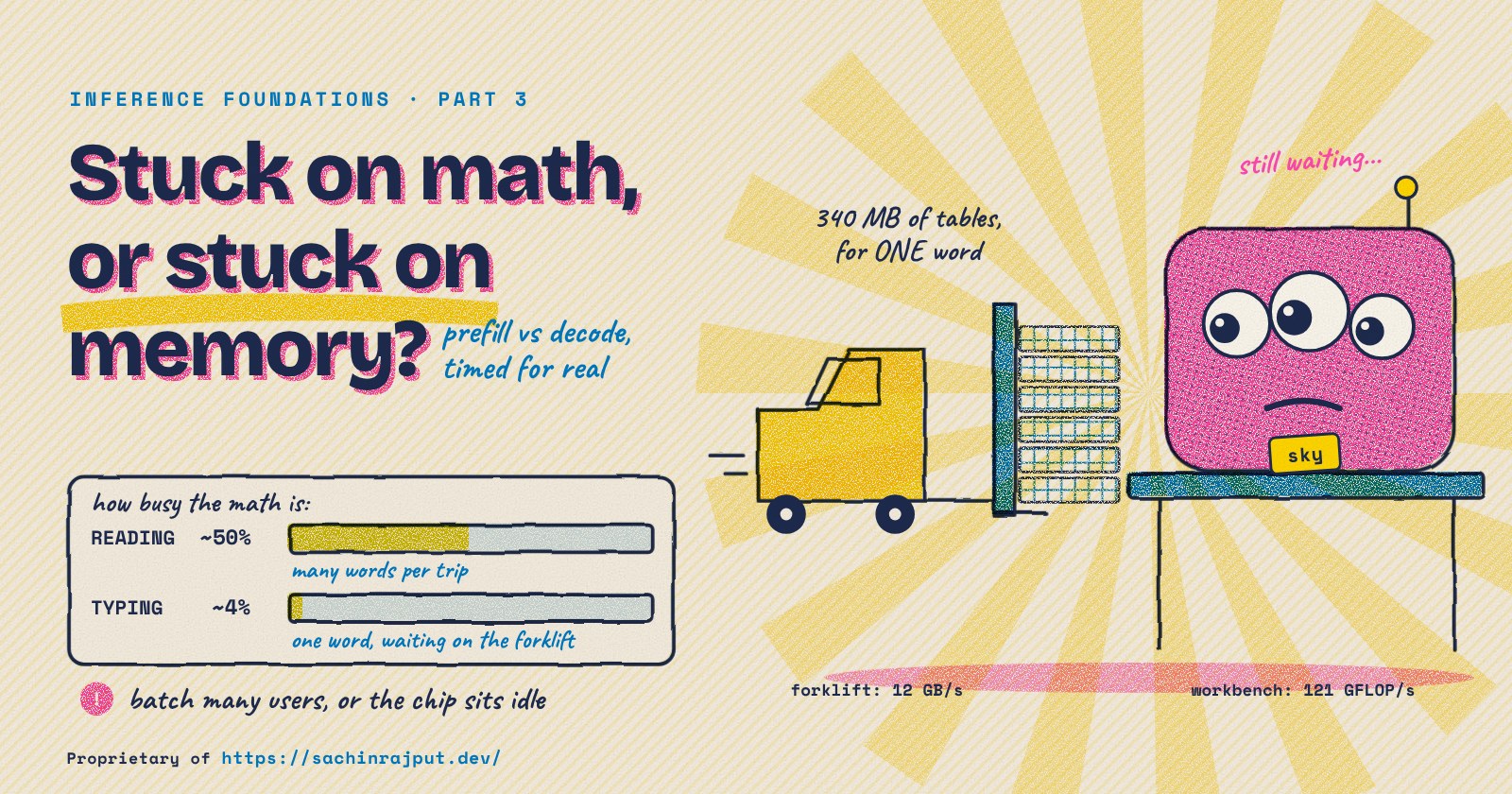
The workbench and the forklift
Let's add two things to our Word Factory picture.
- The workbench is where the math happens. It's very fast.
- The warehouse is where the model's tables live: all 340 MB of them (the 85 million numbers from Part 2). It's big, and it's far away.
- The forklift carries tables from the warehouse to the workbench. Every trip through the model, every table has to ride the forklift.
So every trip has two jobs: fetch the tables and do the math. Whichever job is slower decides how long the trip takes.
How fast is each one on my computer? I measured both with machine_speed.py:
# Forklift: push ONE token through a 400 MB table.
# Every number is used once, for just 2 FLOPs, so this is almost pure fetching.
big = np.ones((10_000, 10_000), dtype=np.float32)
sec = best_of(lambda: big @ one)

# Workbench: multiply two 2048 x 2048 tables.
# They fit close to the workbench, so this is almost pure math.
sec = best_of(lambda: a @ b)
memory speed :   12.0 GB/s   (read 400 MB in 33.3 ms)
math speed   :  120.9 GFLOP/s (17.2 GFLOPs in 142.1 ms)
balance      :   10.1 FLOPs per byte
tokens a trip needs to keep the math busy: about 20
The forklift brings 12 billion bytes per second. The workbench does 121 billion math steps (FLOPs) per second. So for every byte the forklift delivers, the workbench could do about 10 math steps.
Now look at what one table number gives us. It takes 4 bytes to fetch, and it's used for 2 FLOPs per token (one multiply, one add, like in Part 2).
- With 1 token on the trip: 2 FLOPs for 4 bytes. That's half a math step per byte, when the workbench could do 10. The workbench sits idle about 95% of the time, waiting for the forklift.
- With 20 tokens on the trip: 40 FLOPs for 4 bytes, 10 per byte. Now the forklift and the workbench are perfectly matched.
- With more than 20: the forklift is waiting on the workbench instead.
Engineers call "how much math per byte fetched" the arithmetic intensity. When it's low, a job is memory-bound (stuck on the forklift). When it's high, it's compute-bound (stuck on the workbench).
Reading your question puts hundreds of tokens on each trip. Typing puts one. You can probably guess where this is going.
The experiment
I upgraded Part 1's tiny factory so the Typewriter can type for several users in the same trip. That's two_phases.py, about 130 lines of NumPy. Same shape as before (GPT-2 small: 12 floors, width 768), random numbers inside, so the words are gibberish but the work is real.
The heart of it is one trip through the 12 floors. The big tables are shared by every token on the trip. But each user's attention reads only that user's notebook (the KV cache):
def trip(self, x, segments):
    for i, p in enumerate(self.layers):                  # 12 floors
        q, k, v = np.split(p["qkv"] @ norm(x), 3)        # shared tables
        outs = []
        for user, t in segments:                         # each user...
            ...                                          # ...writes and reads
            att = q_user @ user_notes_K / HD ** 0.5      #    their OWN notebook
            outs.append(softmax(att) @ user_notes_V)
        x = x + p["out"] @ np.concatenate(outs, 1)       # shared tables
        x = x + p["down"] @ gelu(p["up"] @ norm(x))      # shared tables
    return x
(Shortened for reading. The full file is what I ran.)
Reading (prefill) is one trip with all of the user's question on it. Typing (decode) is one trip with one token for each user who is waiting for their next word.
Every test ran 5 to 7 times and I kept the middle result. Plain CPU, 2 cores, no GPU.
Phase 1: Reading is stuck on the workbench
One user, questions of different lengths:
 prompt   time ms  ms/token  GFLOP/s
      1      32.7     32.75      5.2
     16      86.6      5.41     31.4
     64     184.6      2.88     58.9
    256     726.4      2.84     59.9
   1024    4278.3      4.18     40.7
(GFLOP/s here counts the table math only.)
Read it top to bottom:
- A 1-token "question" costs 33 ms, about the same as typing one word. Of course: it's the same trip with one passenger.
- At 64 to 256 tokens, each token costs under 3 ms. The trip ran at about 60 billion FLOPs per second, half the workbench's top speed. The forklift isn't the problem any more: it fetched each table once and the workbench used it 256 times.
- At 1,024 tokens, each token got a bit more expensive again (4.2 ms). That's the notebook from Part 2: every token in a long question has to look at every other token, so that part of the work grows faster than the question.
Reading is compute-bound. To make it faster, you need a faster workbench: more math per second. That's why the wait for the first word (TTFT) depends mostly on how long your question is and how much raw math the chip can do.
Phase 2: Typing is stuck on the forklift
Now the Typewriter. Each user already has 512 notes in their notebook, and we type one new token for 1, 4, 16 and 64 users in the same trip:
  users   step ms  tokens/s  GFLOP/s  MB read
      1      37.5      26.6      4.5      377
      4      85.3      46.9      8.0      491
     16     162.5      98.5     16.7      944
     64     461.8     138.6     23.5     2756
One user: 37.5 ms per word, using less than 4% of the workbench (4.5 of 121 billion FLOPs per second). The trip had to fetch 377 MB (the tables, plus this user's notebook). At 12 GB/s, just fetching that takes about 31 ms. So more than 80% of the typing time is the forklift.
Typing is memory-bound. A faster workbench would barely help. A faster forklift, or fewer bytes to fetch, would.
So put more people on the bus
Here's the trick every real chatbot server uses: type for many users in the same trip. The tables get fetched once and shared by everyone. Engineers call this batching (and when users can join and leave the batch at any step, continuous batching).
It works:
- 1 user: 26.6 tokens per second in total.
- 16 users: 98.5 tokens per second, 3.7 times more, from the same machine.
- 64 users: 138.6 tokens per second, 5.2 times more.
But look at what each person feels. The gap between their words went from 37.5 ms (alone) to 162.5 ms (with 16 others) to 462 ms (with 64). The factory got more productive; each customer got a slower typist. That's the trade-off every chatbot company tunes all day long: throughput for the business versus speed for each user.
The notebooks don't share
Why didn't 64 users give 64 times the tokens? Look at the last column, MB read.
The tables are shared, so they're fetched once: 340 MB. But every user brings their own notebook, and the Typewriter has to read all of it, every step. Each note is 72 KB (Part 1), and each user here has 512 of them, about 38 MB per user:
 1 user :  340 MB tables +    38 MB notebooks =   377 MB
64 users:  340 MB tables + 2,416 MB notebooks = 2,756 MB
At 64 users, the notebooks were seven times bigger than the whole model. The forklift spends most of its time carrying notebooks, and those can't be shared.
That's why so much engineering goes into the notebook: storing it in smaller numbers, sharing the parts that are the same for many users (like a common system prompt), and splitting it into neat blocks so no memory is wasted. Those are later parts of this series.
When the two phases share a server
Real servers do both jobs at once: some users are waiting for their next word while a new user's question needs reading. What happens when they collide?
I set up 8 users typing, then a new user arrives with a 1,024-token question:
normal gap between words for the 8 typers :    118.0 ms
gap if the engine reads all 1,024 at once :   4723.0 ms (one huge freeze)
gap if it reads 128 tokens between steps  :    671.2 ms (8 small bumps, worst one)
If the engine reads the whole question in one go, all 8 typers freeze for almost 5 seconds, 40 times their normal gap. In a chat app that looks broken.
If it reads the new question in chunks of 128 tokens, squeezing one chunk in between typing steps, nobody freezes. Each typer gets 8 slower words (at worst 671 ms) instead of one 5-second freeze. Engineers call this chunked prefill, and the chunk size is a dial: bigger chunks get the new user their first word sooner, smaller chunks keep everyone else's typing smoother.
You can play with exactly this dial in the scheduler simulator on my site, which shows how vLLM's per-step token budget trades the new user's wait against everyone else's stutter.
A second bug, caught the same way
When I first ran these tests, reading only reached about 29 billion FLOPs per second, a quarter of the workbench's top speed. A job that should be stuck on math wasn't even using most of the math. So, like in Part 2, I didn't trust the number and went looking.
The culprit was the "squish" curve in the thinking room, which cubes numbers. I'd written it as h**3. Here's cube_bug.py, doing the same math two ways on 786,432 numbers (one floor's worth for a 256-token question):
all positive   h**3:   1.65 ms   h*h*h:  0.80 ms   (   2x)
all negative   h**3: 109.63 ms   h*h*h:  1.01 ms   ( 109x)
mixed (real)   h**3:  55.47 ms   h*h*h:  1.01 ms   (  55x)
numpy 2.5.3
Same answer, but ** takes a slow road for negative numbers, and about half the numbers in a real model are negative. Writing h * h * h instead made reading about 2 times faster.
That line was also in Part 1's and Part 2's code. It barely touched typing (one token is only 3,072 numbers per floor), but it made reading look twice as slow as it is. With both bugs fixed, Part 1's tiny factory reads at about 2.6 ms per token and types at about 37 ms, so reading is about 14 times cheaper per token. I've corrected Part 1 and Part 2, and added notes to both.
The lesson is the one this whole post is about: before you trust a timing, work out what the machine should do from its forklift speed and its workbench speed. When the measurement is far off, something is wrong, and it's usually not the machine.
Why this matters on a real GPU
Our numbers come from a small CPU, but the shape of the problem is the same on a data-center GPU, only more extreme. A modern GPU's workbench is so much faster than its forklift that it can do a few hundred math steps per byte, not 10. So:
- Reading (prefill) still keeps the workbench busy, because a long question puts hundreds or thousands of tokens on the trip.
- Typing (decode) for one user leaves the GPU's workbench idle more than 99% of the time. Batching many users isn't a nice-to-have, it's the only way the chip pays for itself.
Cheat sheet
| Prefill (reading) | Decode (typing) | |
|---|---|---|
| Tokens per trip | The whole question | One per user |
| Stuck on | Math (the workbench) | Fetching (the forklift) |
| Engineer's word | Compute-bound | Memory-bound |
| Decides | Wait for the first word (TTFT) | Gap between words (ITL) |
| Made faster by | More math per second | Fewer bytes per token, batching users |
| On my CPU | ~3 ms per token at 256 tokens | ~38 ms per token for one user |
| Idea | One line |
|---|---|
| Balance | This CPU does ~10 math steps per byte fetched, so a trip needs ~20 tokens to keep the math busy |
| Batching | 16 users: 3.7x more tokens per second, but each user's gap gets 4.3x longer |
| Notebooks | Tables are shared by the batch; every user's KV cache is not |
| Chunked prefill | Reading a long question in pieces turns one 5-second freeze into a few small bumps |
What's next
Today we had two speed limits: the forklift and the workbench. Part 4: The Roofline Model for LLM Inference draws both on one picture, so you can look at any model, any GPU and any batch size and see which limit you'll hit, before you run anything.
Every number in this post comes from running three scripts: machine_speed.py, two_phases.py and cube_bug.py. Snippets above are shortened for reading; the files are the exact code I ran. The tiny model used random weights on a 2-core cloud CPU, so it shows the pattern, not the speed of any real GPU.
Part 3 of 10 · Inference Foundations
Read the whole series
- One Request, End to End: Tokenize, Prefill, Decode, Stream15 min read
- A Forward Pass for One Token: Where the FLOPs Go14 min read
- Prefill vs Decode: Two Phases, Two BottlenecksYou are here
- The Roofline Model for LLM InferenceComing soon
- The KV Cache From ScratchComing soon
- How Much GPU Memory Do I Need?Coming soon
- Continuous Batching and PagedAttentionComing soon
- Speculative Decoding BasicsComing soon
- Tensor, Pipeline and Expert ParallelismComing soon
- Quantization Formats: FP16, BF16, FP8, INT8, INT4Coming soon